My Aadhaar UIDAI Download Aadhar Card, Update, and Check Status 2025
Empowering Every Indian with Smart Aadhaar Access
My Aadhaar UIDAI is your trusted digital guide for everything related to Aadhaar from downloading your e-Aadhaar and checking update status to locating nearby enrolment centres or generating your Virtual ID (VID).
Our mission is to make every Aadhaar process simple, secure, and accessible so you can manage your identity easily, anytime, anywhere in India.
Aadhaar Services
Access a full range of Aadhaar services online update your details, download your Aadhaar card, track your application status, and more.
Request a durable, wallet-friendly PVC version of Aadhaar.
View→
Find nearby Aadhaar centers for new enrollments or updates.
View→
Verify if your Aadhaar is active and valid.
View→
Generate 16 Digit Virtual ID(VID) linked to your Aadhaar.
View→
What Is Aadhaar and UIDAI?
Understanding Aadhaar
Aadhaar is a 12-digit unique identification number issued by the Unique Identification Authority of India (UIDAI).
It acts as a universal proof of identity and address across India essential for banking, telecom, subsidy benefits, and digital services.
Your Aadhaar includes both demographic data (name, address, date of birth, gender, etc.) and biometric data (fingerprints, iris, and photograph).
Role of UIDAI
The UIDAI, established under the Ministry of Electronics and Information Technology (MeitY), manages Aadhaar enrolment, updates, and authentication services.
It ensures data security through encrypted storage in the Central Identities Data Repository (CIDR) and maintains legal compliance under the Aadhaar Act, 2016.
Aadhaar Services on My Aadhaar UIDAI
Our platform connects you directly to essential Aadhaar services and tools.
Each section below explains what the service does and how you can access it through official UIDAI channels.
1. Download Aadhaar (e-Aadhaar)
Step-by-step guide to get your digital Aadhaar:
- Visit myaadhaar.uidai.gov.in.
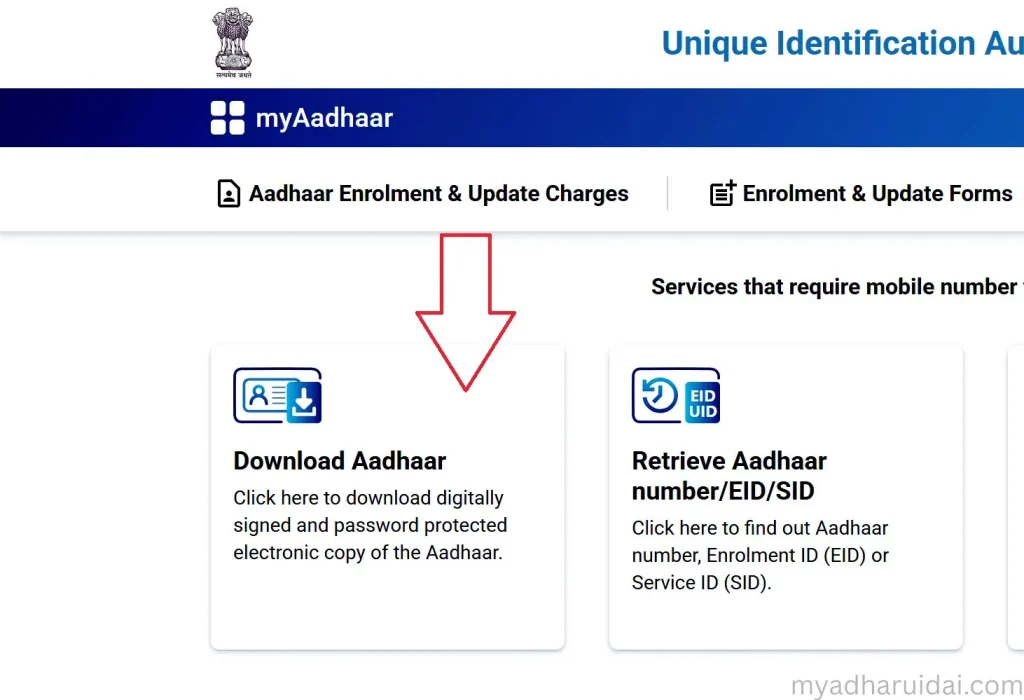
- Click on Download Aadhar Card.
- Enter your Aadhaar Number (UID), Enrolment ID (EID), or Virtual ID (VID).
- Complete the captcha and verify using OTP.
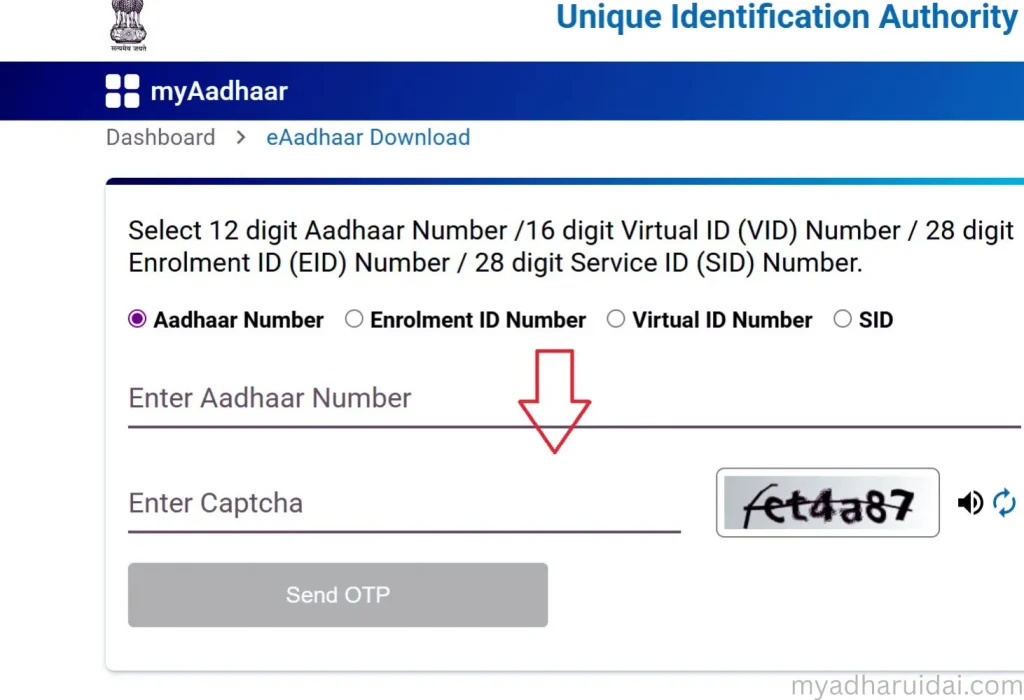
- You’ll receive a One-Time Password (OTP) on your registered mobile number.
- Enter the OTP to continue.
- Download the PDF file.
Password tip:
Use the first four letters of your name in UPPERCASE + your birth year (Example: RAVI1998).
The e-Aadhaar is a valid and legally recognized identity document under the Aadhaar Act 2016.
2. Update Aadhaar Details
Need to change your name, address, or date of birth? Follow these steps:
- Visit myaadhaar.uidai.gov.in
- Log in using your Aadhaar number and OTP
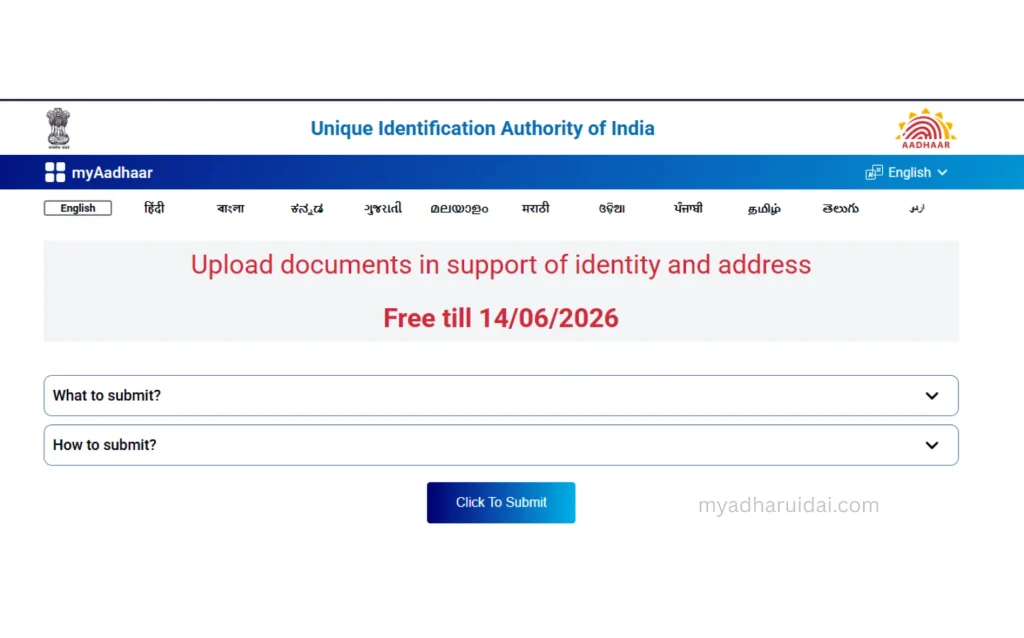
- Choose Document Update
- Upload valid Proof of Identity (PoI) and Proof of Address (PoA)
- Review and submit
Note: UIDAI has made document update free until June 14, 2026.
Always ensure documents are clear and valid as per UIDAI standards.
3. Check Enrolment or Update Status
You can track your Aadhaar’s progress anytime:
- Go to Check Enrolment/Update Status on myaadhaar.uidai.gov.in
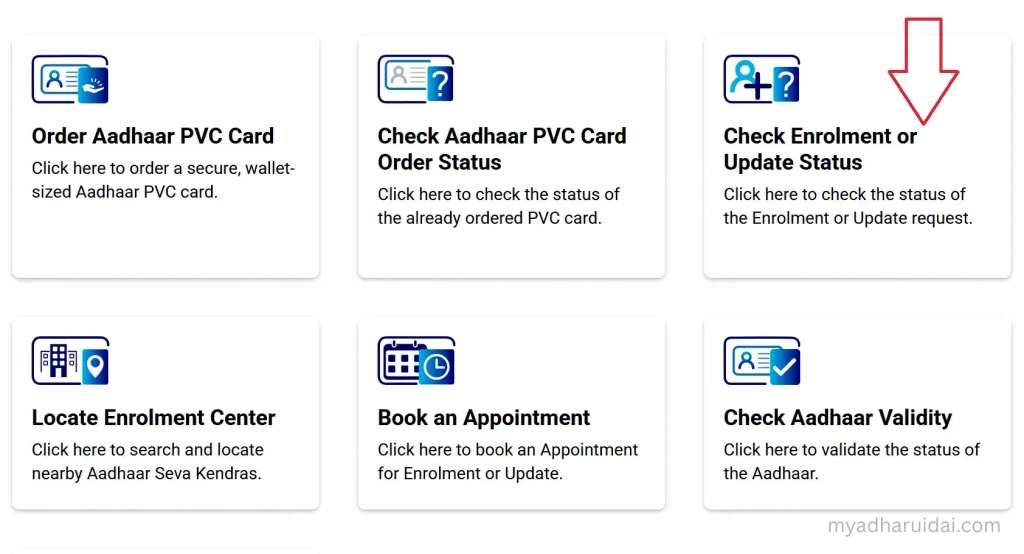
- Enter your EID or URN (Update Request Number).
- Authenticate with OTP to see whether your Aadhaar is generated, under process, or updated.
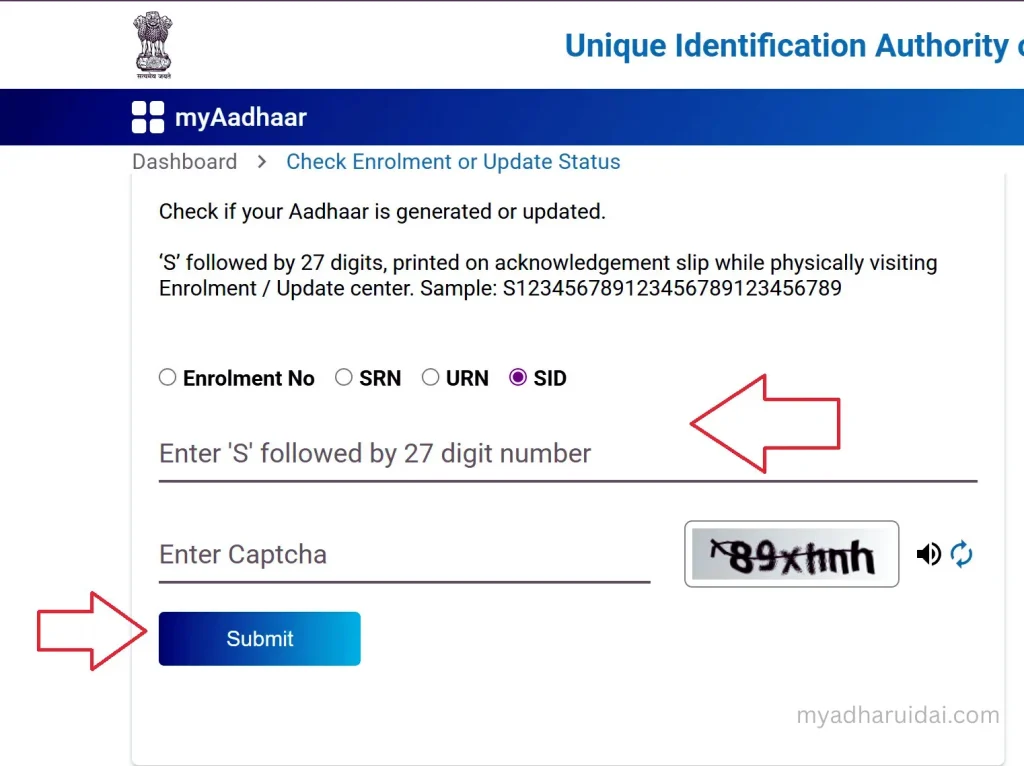
📞 Alternate option: Call 1947 (UIDAI toll-free helpline) and follow the IVR instructions.
4. Retrieve Lost Aadhaar or Enrolment ID
If you’ve misplaced your Aadhaar or EID:
- Visit https://myaadhaar.uidai.gov.in/, and click on the Retrieve EID/Aadhaar Number tool.
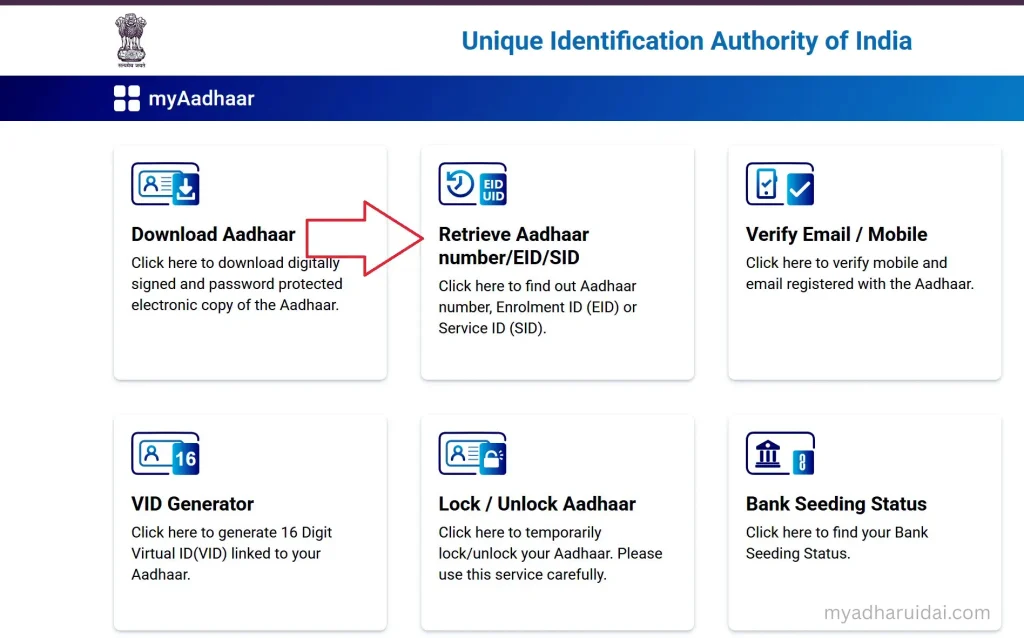
- Enter your full name, registered mobile number, or email ID
- Verify via OTP
- Retrieve your Aadhaar or EID instantly through SMS or email
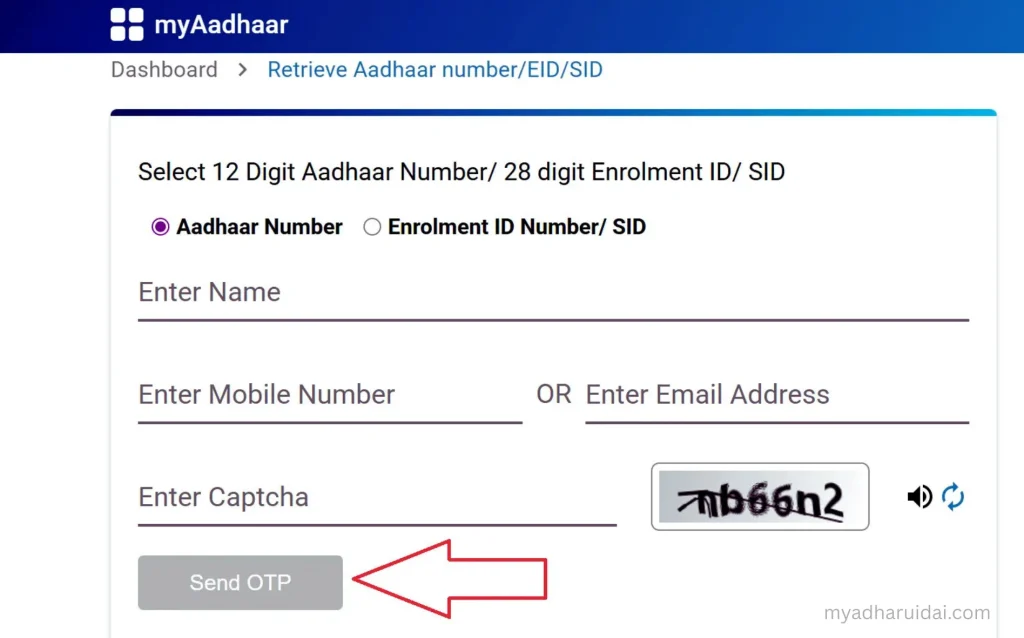
This helps users recover credentials securely without visiting any office.
5. Verify Email or Mobile Number
Ensuring your contact details are correctly linked to Aadhaar is essential for OTP-based logins.
- Visit Verify Email/Mobile Number section.
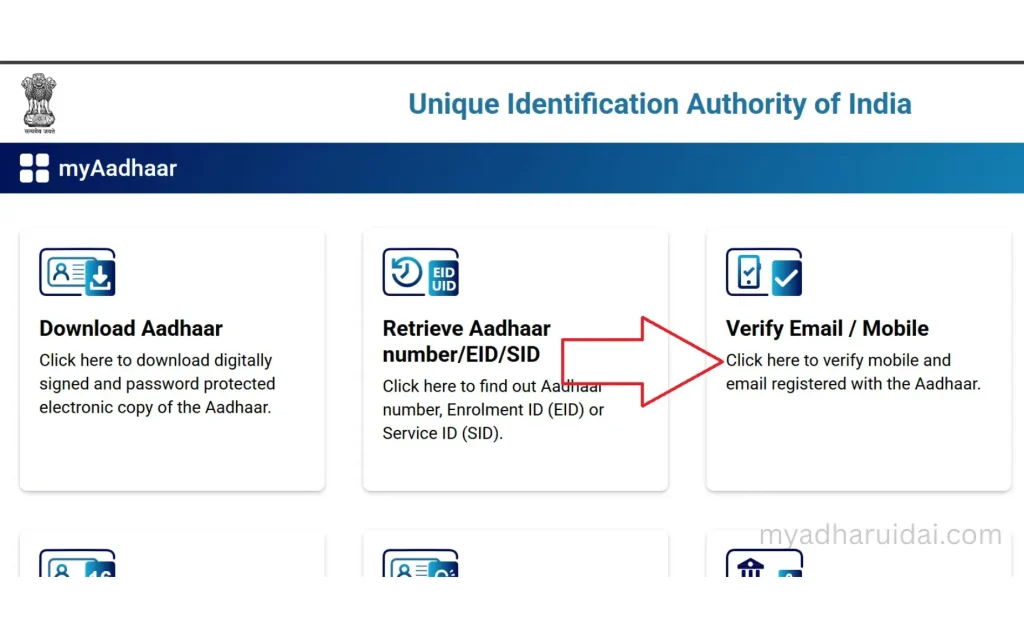
- Enter Aadhaar number and contact info.
- Submit captcha and verify via OTP.
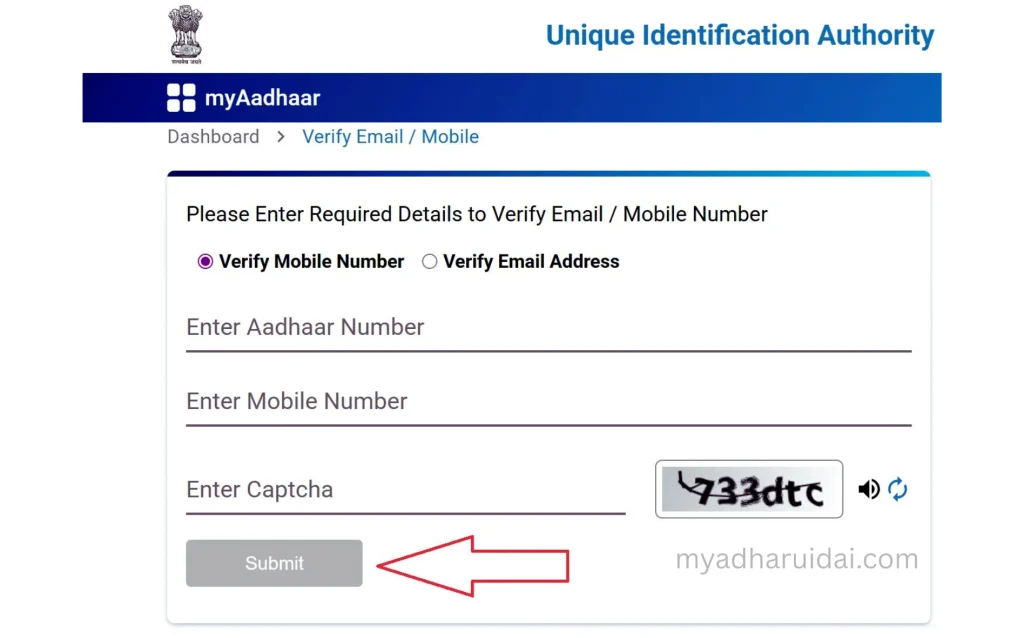
If your details are correct, a success confirmation appears immediately.
6. Generate or Retrieve Virtual ID (VID)
A Virtual ID (VID) is a temporary 16-digit code used instead of your Aadhaar number for added privacy.
- Visit https://myaadhaar.uidai.gov.in/, and click on the VID Generator option.
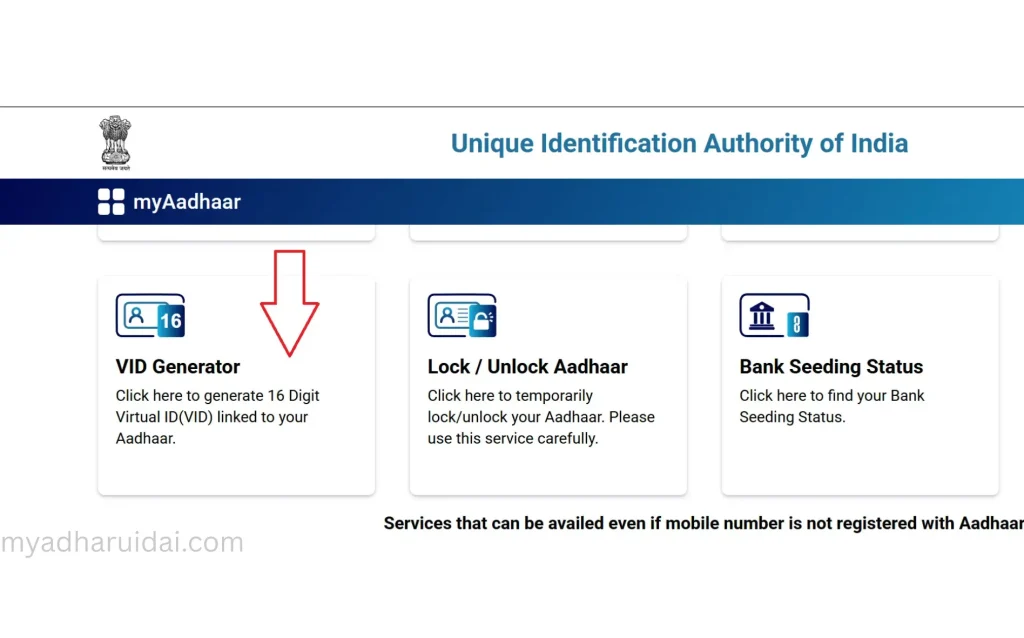
- Log in using Aadhaar + OTP
- Choose Generate New VID or Retrieve Existing VID
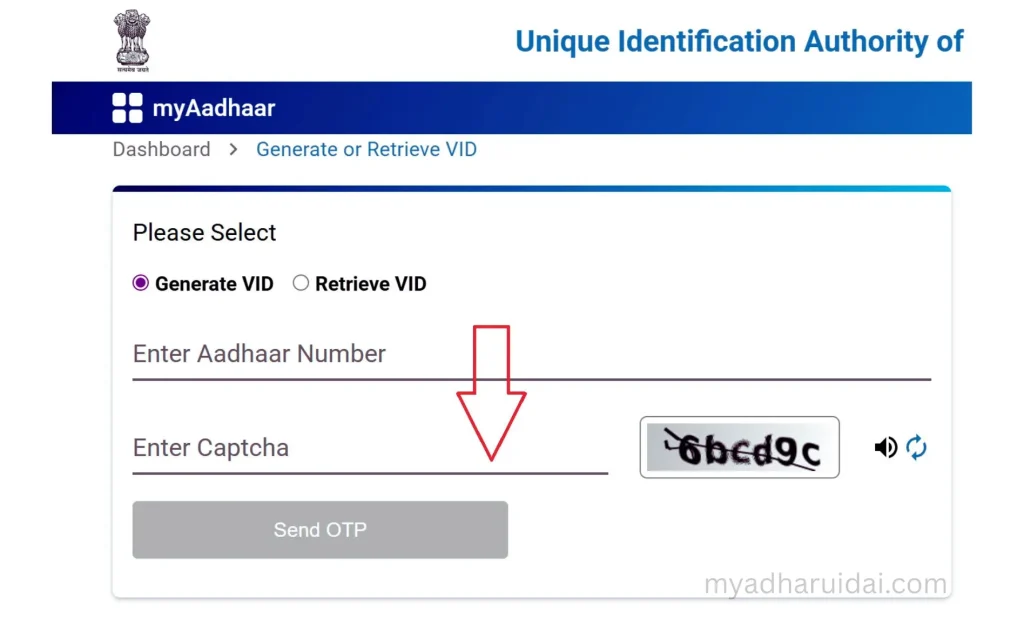
The generated VID is valid until replaced and sent directly to your registered mobile number.
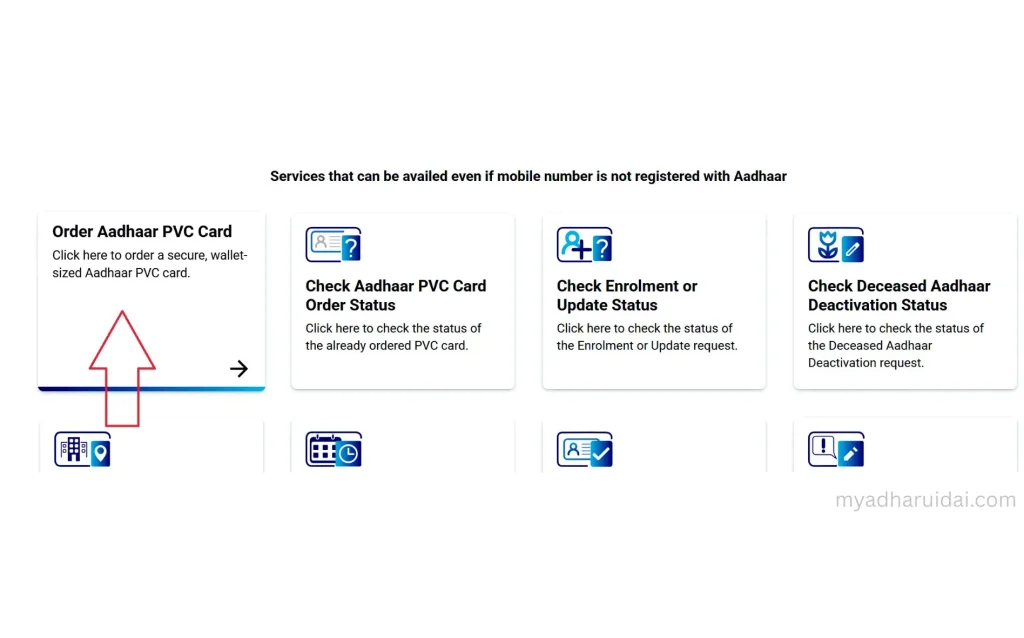
7. Order Aadhaar PVC Card
Get your durable, wallet-sized Aadhaar card delivered to your home:
- Go to Order Aadhaar PVC Card.
- Enter Aadhaar number and captcha
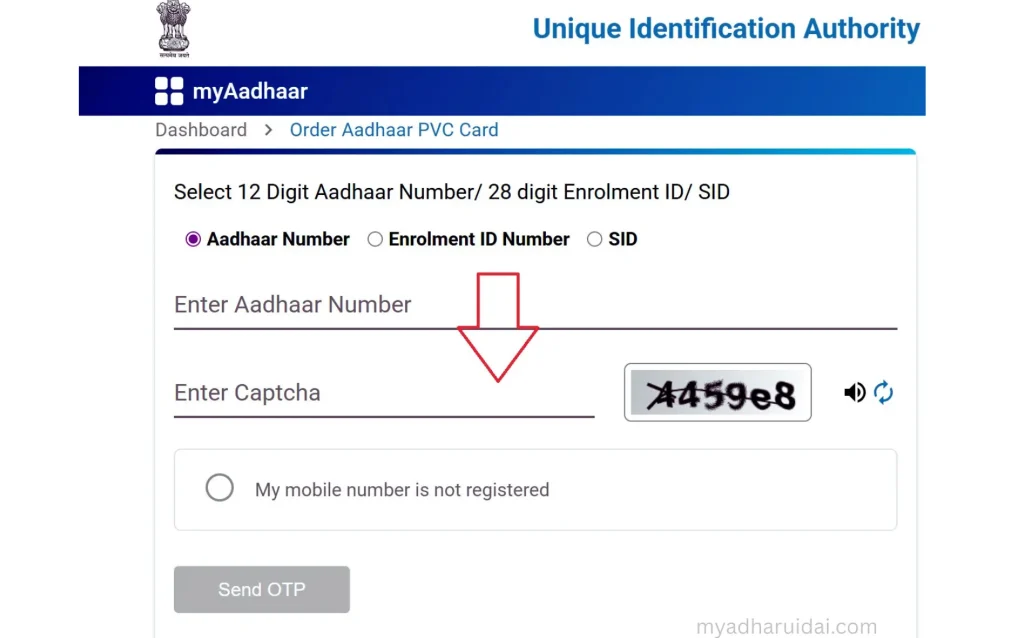
- Pay ₹50 (inclusive of GST and delivery)
- Your PVC card will be printed and dispatched by UIDAI via Speed Post
You can track its status under Check PVC Card Status using your 28-digit Service Request Number (SRN).
8. Locate Aadhaar Enrolment Center
To enrol or update biometrics, visit an authorised Aadhaar Seva Kendra:
- Visit Locate Enrolment Center.
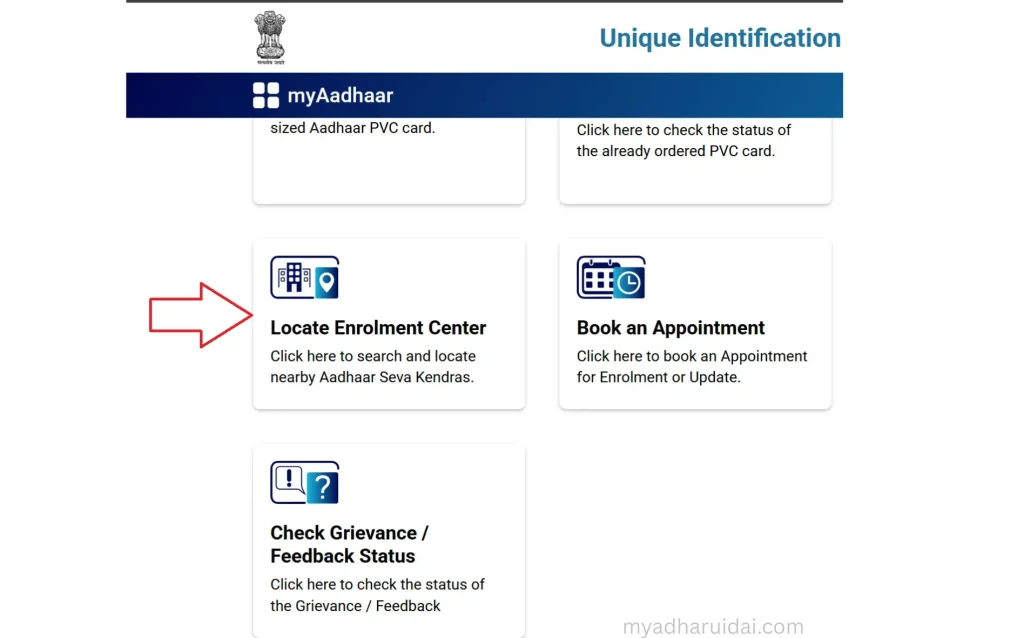
- Search by PIN code, city, or state
- Get centre details, address, and contact number
Offline updates like mobile number or biometric changes are processed only at these centres.
9. Book Aadhaar Appointment Online
Avoid queues by scheduling your visit online:
- Visit Book Appointment section.
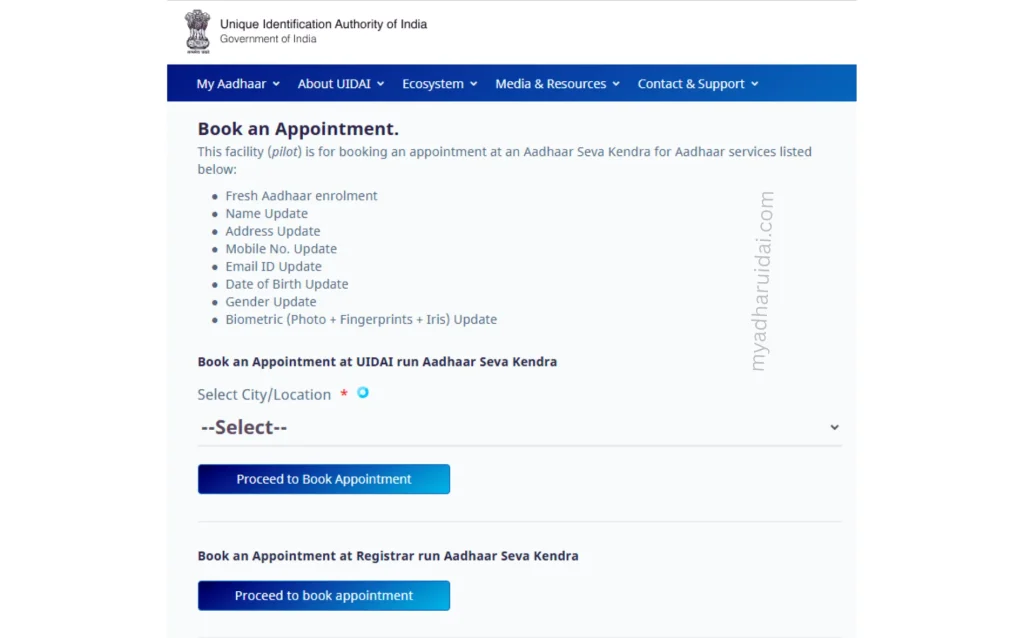
- Select your nearest enrolment centre
- Pick your preferred time slot
Bring your Aadhaar and supporting documents during the visit.
10. Check Aadhaar Validity
You can verify if your Aadhaar is active:
- Visit Aadhaar Verification Tool.
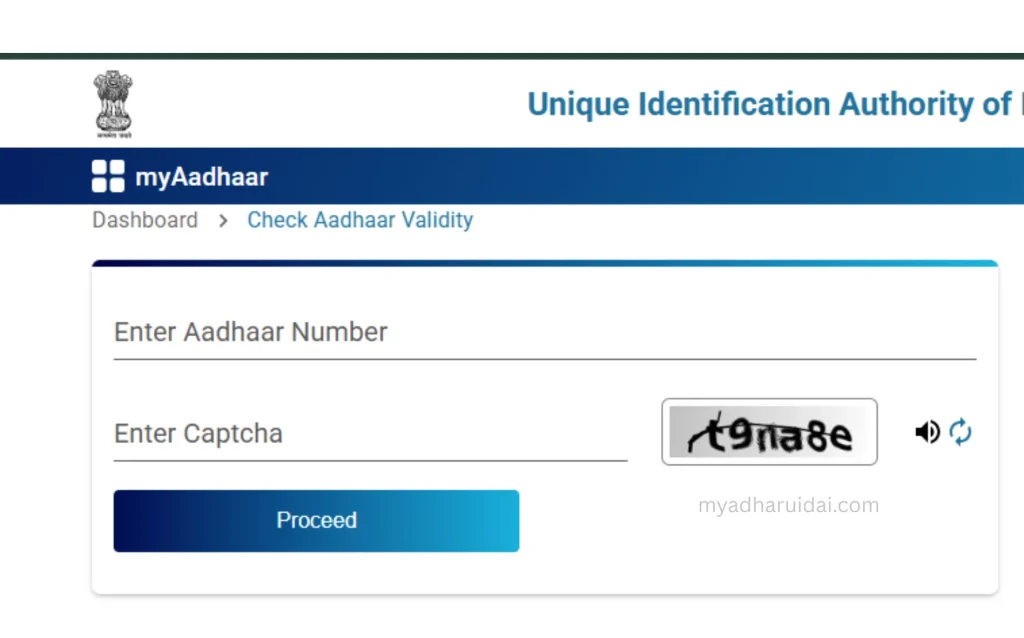
- Enter your Aadhaar number and captcha.
- The portal confirms if your Aadhaar exists and is operational.
My Aadhaar Login
The My Aadhaar Login dashboard allows you to access all UIDAI tools in one place.
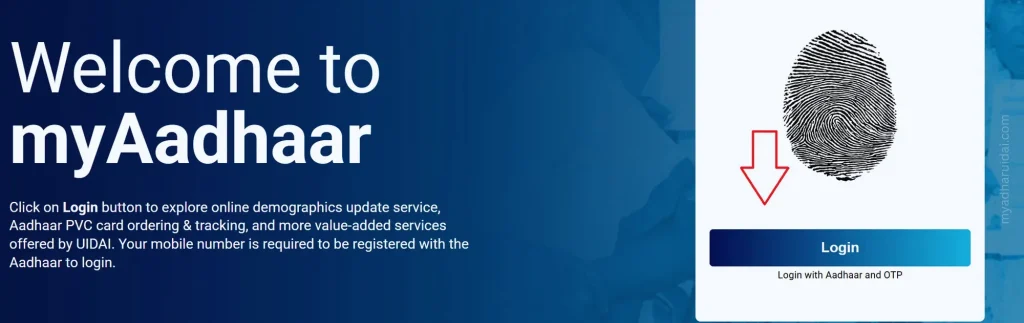
Login process:
- Visit myaadhaar.uidai.gov.in
- Click Login
- Enter Aadhaar number and captcha
- Authenticate using OTP sent to your registered mobile
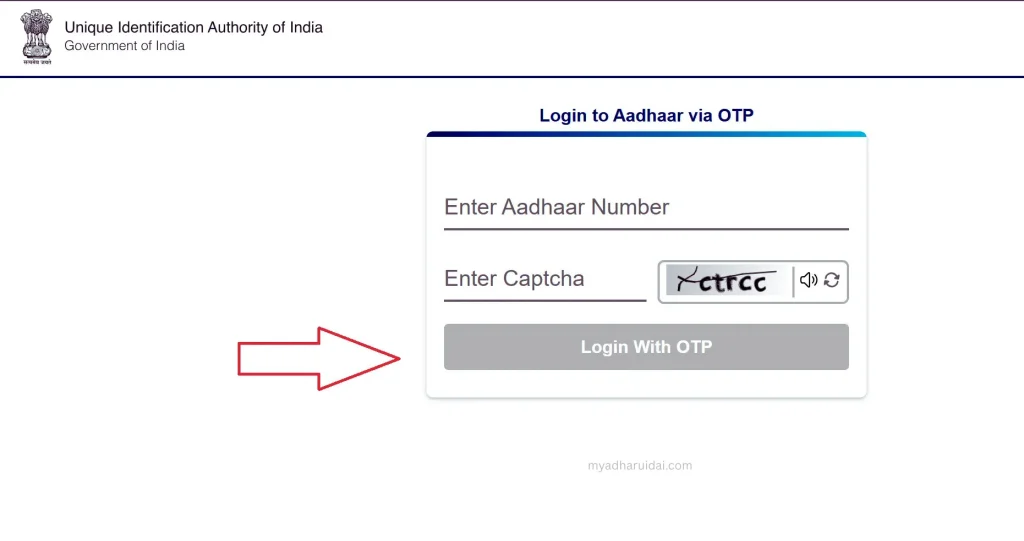
Once logged in, users can download e-Aadhaar, update documents, check PVC status, and more.
Official UIDAI Tools Linked on My Aadhaar UIDAI
| Tool | Function |
| UIDAI Aadhaar Download | Get digital e-Aadhaar instantly |
| Update Document | Upload PoA/PoI for correction |
| Check Status | Track enrolment or update |
| Retrieve EID/Aadhaar | Recover lost IDs securely |
| Generate VID | Create virtual Aadhaar number |
| Verify Email/Mobile | Confirm registered contacts |
| Locate Center | Find nearby Aadhaar offices |
| Order PVC Card | Request plastic Aadhaar card |
Benefits of Aadhaar for Every Indian
Aadhaar is not just an ID, it’s your digital key to countless essential services:
- Government Subsidies: Receive LPG, PM-KISAN, and Ayushman Bharat benefits directly.
- Banking: Simplifies KYC for accounts, mutual funds, and insurance.
- Digital Payments: Enables Aadhaar-based UPI and AEPS transactions.
- Telecom & Travel: Quick SIM activation and online verification for passports.
- Education: Used in scholarship, exam registration, and verification processes.
It helps you use these benefits efficiently without confusion or delay.
Security, Privacy & Legal Framework
UIDAI prioritizes data safety and privacy:
- All Aadhaar data is stored in an encrypted format in CIDR.
- UIDAI uses biometric deduplication to prevent identity duplication.
- Aadhaar information cannot be shared without consent, as per the Aadhaar Act, 2016.
- Masked Aadhaar and VID options ensure privacy while sharing.
My AadhaarWais educates users on safe Aadhaar practices always guiding them to official UIDAI portals only.
Latest Aadhaar Updates (2025 Highlights)
- Free Online Document Update extended till June 14, 2026.
- Baal Aadhaar now supports linking to parents’ updated Aadhaar automatically.
- PVC Card delivery made faster with integrated DoP tracking.
- AI-based verification for e-Aadhaar QR codes introduced for instant validity checks.
Stay tuned to My Adharuidai for all verified Aadhaar-related news and updates.
Aadhaar Helpline and Support
Need help? UIDAI offers multilingual support across India.
- Toll-Free: 1947 (available 24×7)
- Email: help@uidai.gov.in
- Official Website: uidai.gov.in
- Mobile App: mAadhaar (available on Play Store and App Store)
For clear guidance, use My Aadhaar UIDAI to access step-by-step Aadhaar resources anytime.
About My Aadhaar UIDAI
This is an independent information platform built to simplify Aadhaar-related processes for Indian residents.
We are not affiliated with UIDAI, but our goal is to help users navigate official Aadhaar tools safely and effectively.
We provide:
- Verified, updated Aadhaar guides
- Tool-based links for all UIDAI services
- Real-time update coverage and FAQs